









Mr. TomatoS looks like a cheerful kitchen toy from an old browser portal but plays like a slow, stressful lesson in resource management. The pitch greets you like a friendly host, then strikes through words such as fun and dying, which tells you what kind of game you are about to open. You feed a very hungry tomato who has no hands, earn points, and try to keep his temper under control.
The core loop is easy to explain. Food shows up, you drag it to the tomato’s mouth, and every correct feed adds points that you spend in the shop between levels. He has no hands, so you are the only thing standing between him and an empty stomach. Early in the game the pace is gentle, and an interactive tutorial walks you through picking up food, feeding him, and using the blender. That soft start is deliberate, because the real pressure only arrives once his anger begins to climb.
The anger meter is the number every player watches. It rises when you waste resources or feed him badly, and by the time it reaches 9 the whole run feels balanced on a knife edge. One player on the community board described giving him milk at anger 9, hearing him say he never asked for it, and watching the meter jump to 10. The player closed the game immediately and admitted to being scared to come back.
Think of anger as the real health bar. Points only matter if the tomato is calm enough for you to use them. Horror fans tend to enjoy this tension, since the threat is never a monster, only a mood.
The blender is where the game stops being a simple feeding toy. You combine food in it and serve the result, and the way you plan those combinations decides how far your points stretch. Experimenting is harmless in the first level, but wasteful experiments cost you points you will want later. Treat every blender run as an investment instead of a toy.
A basic blender is available early, and an upgraded Hi-tech blender artifact exists for players who also own the sister game Ms. LemonS. Buying the artifact there puts it into this game as well, and it pays out more points than the basic one. The two games read each other’s files, which is why they feel like rooms in the same strange house.
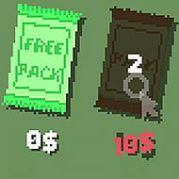
Other items support the blender. Candy is a safe purchase as long as anger sits at 3 or lower, while the knife is the item veterans tell newcomers to ignore. Players who love optimizing will enjoy working out which helpers earn back their price and which are traps.
Points are scarce, and the shop punishes impulse buying. Community veterans who finished the game suggest a very specific spending plan, and it starts with restraint. Buying almost nothing between levels one and two builds the reserve that everything else depends on.
The plan assumes you want to reach the later levels with enough points left for the Hi-tech blender. You can ignore it and still finish, but you will probably feel the pinch around level 5, when the translator becomes necessary and your wallet is already empty.
The game never explains any of this upfront, so first-time players usually overspend on candy and gadgets and feel the shortage later. For some players that trial and error is the charm. For others it is the most irritating part of the first hour.
The standard edition is built around one rule: you can complete the game only once, so the ending you reach is the ending you keep. That makes every decision around the anger meter feel heavier, because there is no second lap to repair a bad run. The ++ edition quietly changes that by letting you reset your progress after completion and chase more endings.
In the ++ edition you reset by pressing Enter on the warning screen, and sometimes you need to reset the sister game first. Players on the standard edition have another route, since progress is stored in data files on your computer and clearing them wipes the slate. Some players feel a paid reset puts a wall around replay value, while others argue the single playthrough is what gives the game its weight.
Ending hunters have plenty to chase, including the notorious global delete ending, which involves editing game files and finding an access code. The alarming messages that appear during the bad version of that ending are fake, according to the community FAQ, so there is no reason to panic.
Search for this game and the first worry is almost always whether it is a virus. The community answer is no, but it does mess with your computer in ways that look suspicious. It creates and edits files and throws up system-style messages, which is exactly what scanners are trained to distrust. The creator has described the flags as false positives, and long-time players repeat that.
One theory about why scanners flag Mr. TomatoS more than Ms. LemonS is that the tomato’s game creates and checks many more files. It also has to read what its sister game stores, including the Hi-tech blender data.
Not everyone is comfortable with that, and refusing on principle is a fair call. If you decide to try it, a short routine helps.
No. Both it and Ms. LemonS modify each other’s files and display system-style messages, which is why scanners raise flags, but the creator and the community FAQ call these false positives. The fake warnings in the bad global delete ending are part of the show.
In the ++ edition you press Enter on the warning screen, and sometimes you must reset the sister game first. Standard edition players can clear the game data files, though that route is less tidy and is a common source of confusion on the forum.
Nothing between levels one and two. After that, buy the scissors for level 3, a few flashlights for level 4, and the translator for level 5, ignore the knife, and only grab candy while the anger meter is at 3 or lower.
Mr. TomatoS works best when you treat the anger meter, the shop budget, and the Hi-tech blender from Ms. LemonS as one connected puzzle. A single sitting lasts around half an hour, which makes it easy to try, and the strange mix of old flash game charm and file-tampering mischief is hard to forget.