







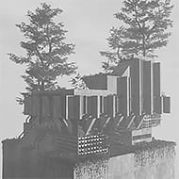
Tiny Brutalism looks like a mood board for a cold concrete city but plays like a quiet toy box where nobody tells you what to build. There is no goal, no timer and no score, only a small plot, a pile of slabs and a switch between day and night. Within a few minutes you work out that the point is making strange monuments, impossible towers or one extremely long wall, and that none of those choices is wrong.
| Genre | Cozy building sandbox |
| Goal | None, build whatever you like |
| Plot size | 4×4 up to 16×16 |
| Look | Black and white concrete |
Click builds, click and hold fills an area, Shift plus click removes, and Ctrl or Cmd plus Z undoes your last move. The camera orbits with a right-drag, pans with a middle-drag and zooms with the scroll wheel. Those few inputs cover nearly everything, which is why it is easy to sit down for one quick tower and look up an hour later at an entire district of slabs.
Early on, the block you place can feel random. Some players described it as nudging a tool rather than building something, and that became the most common early complaint.
The fix is already built in. Hold a block and scroll to flip through variants, and the variant scroller turns that randomness into a choice. Players who like precise control learn it first, while those who prefer happy accidents can ignore it and let the slabs fall where they land. Both approaches produce good-looking results, but they produce very different kinds of buildings.
Beyond plain blocks, three modes give you real control. Slope mode handles angled surfaces, window mode handles openings and cable mode handles the strung lines between parts. Holding a block, a window or a tree opens the same variant scroller for each, so the habit you learn on blocks carries over everywhere.
Window mode has the most variety, since it offers several kinds of opening:
Some players needed a few sessions to notice window mode at all, and others find doors on high ledges or efficient pillars limited. Architecture fans who want exact control may feel the toolset is still small, but the variety in windows keeps towers from looking identical, and cable mode adds just enough clutter to make a facade feel lived in.
Nature mode adds grass, green walls, cascades over the edges of slabs and trees that grow to fit the space. It shifts the mood from stark to overgrown, and the eco-brutalist look suits the harsh geometry surprisingly well. Some players struggle to work out how to get trees to appear, so expect a little experimenting before your first green terrace.
Click the sun icon to toggle day and night. Turn the sun off and the stars come out, and the same tower reads very differently beneath them. It is the quickest way to change the whole feeling of a build, and many players keep both versions of a scene for comparison.
Photos are saved locally, and the Open Folder button in the settings takes you straight to them. Hobbyist graphic designers have turned screenshots into posters, and a musician asked to use edited ones as album art. The most requested addition is exporting builds as 3D meshes, which the creator says is being looked at.
The plot size is the part of the game players debate most. A small plot keeps a build focused and makes it hard to get lost, but anyone dreaming of a sprawling megastructure feels the walls closing in. The size can be changed in the middle of a build, up to 16×16, so a tower that outgrows its plot can simply be given more room.
Working small also teaches you to compose. A single tall block with a ribbon strip of windows, a few embrasures and a sloped base can look more striking than a crowded plot full of everything, and photographers in particular tend to like clean silhouettes.
Players who want to try something specific often start with a single dominant tower, a long wall with cobogó screens, or a stepped monument built entirely from slopes. None of them takes long, and all of them show off what the variant scroller can do.
Tiny Brutalism is at its best when you stop planning and start stacking: scroll through the variant scroller, add a few cobogó screens, push the plot out to 16×16 and finish with night mode and a photograph. The game never asks for a finished city, only one more strange wall.